Postcode routing allows you to treat callers differently in your callflow, based on the location information collected from the caller during the call.
Postcode routing is not automatic and requires a recognised input by the caller. If you are aiming for automatic routing based on the local exchange or mobile district the caller or caller’s number is in, please view our article on How to add geographic routing.
Please note - postcode routing is an advanced feature, and requires multiple entries covering all postcode ranges from 0000-9999 to be implemented effectively.
If you are considering a postcode routing setup, we recommend speaking to a Jet Support consultant before you proceed with your setup.
List of useful Australian postcodes
- NSW Postcodes
- VIC Postcodes
- QLD Postcodes
- SA Postcodes
- NT Postcodes
- WA Postcodes
- TAS Postcodes
- METRO Postcodes (National)
- CBD Postcodes (National)
Setting up Postcode Routing
To set up your Postcode routing, you will need the following information:
| List of postcode ranges |
A list of all postcodes in Australia from 0001-9999. These codes can be done as single entries (eg: 2650-2650 will target only Wagga Wagga) or as a range (eg: 2000-2999 will target all of NSW). Note - ranges cannot overlap, so you you may need to do multiple ranges. For example, splitting up NSW like so: 2000-2321 2322-2322 2323-2415 2416-2416 2417-2999 |
| List of answering points |
An answering point is the external phone number or Jetphone extension that your call will be routed to. For each individual post code entry or range, we will need an answering point. For example, using the same answering points for multiple ranges would look like this: 2000-2321 - 0400 000 001 2322-2322 - 02 9000 0001 2323-2415 - 0400 000 001 2416-2416 - 02 9000 0001 2417-2999 - 0400 000 002 |
| Default number | This is the default answering point that callers will be routed to if we do not recognise their entry (eg: they enter a 4 digit code that is not configured, or they do not make an entry at all) |
| Audio Prompt | The audio file that will play to callers, instructing them to enter their 4 digit postcode. |
| Invalid Entry Audio Prompt | The audio file that will play to callers if they enter a postcode that is either not recognised or incomplete. |
Getting Started
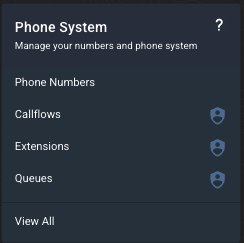
To get started, navigate to the Callflows menu under Phone System.
Find the callflow you want to modify and click the edit button.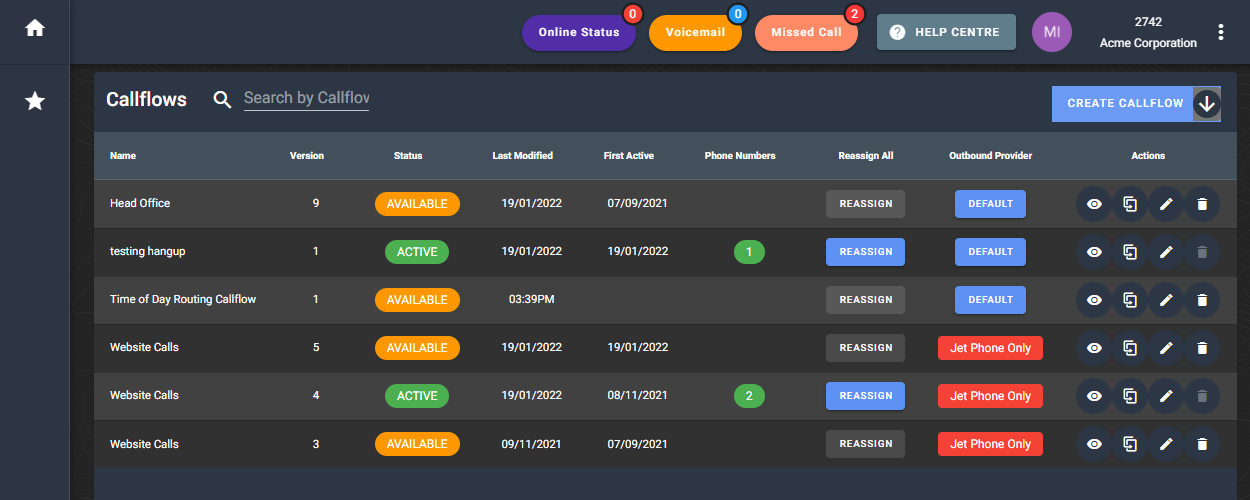
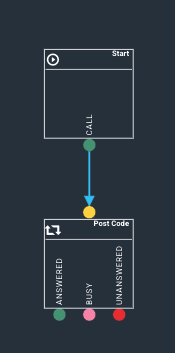
In your callflow, click on the widget selector and drag a Postcode routing widget to the canvas.

Place the widget in your callflow when you want it to be activated. In this example, we are placing it directly underneath the Start widget.
Setting up your default settings
Click on the Postcode widget to open your configuration on the right of your screen. Now we will configure your input settings.
Your Retry Count is how many times your caller can attempt their selection. A rety of 2 means the caller will have 2 attempts - 1 initial and 1 redo - before being deemed as "Default/invalid" and being routed to your default answering point.
The Wait Duration is how many seconds the system will wait to receive a postcode input, before classifying this attempt as invalid.

The image above will give a caller 2 attempts of 8 seconds per attempt.
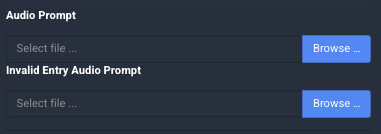
Select the Browse buttons to upload the audio files for your Audio Prompt and your Invalid Entry Audio Prompt files.
Now we need to configure the Default answering point.
Under the DEFAULT region, select the blue Edit pencil.
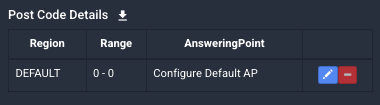
This will load the configuration for the default range.
Select the blue edit pencil next to Configure Default AP.

Select your country from the dropdown, and enter your phone number.
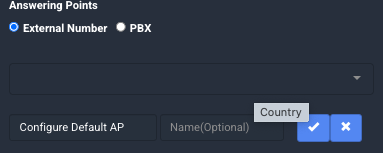
Select the blue tick next to your number to add this answering point, and then select Update to save your Default range.
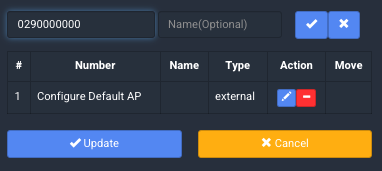
Adding your postcode ranges
You can now add your first postcode range. to do this, select Add.

This will open your new postcode information at the bottom of your configuration window. A blank for will look like this:
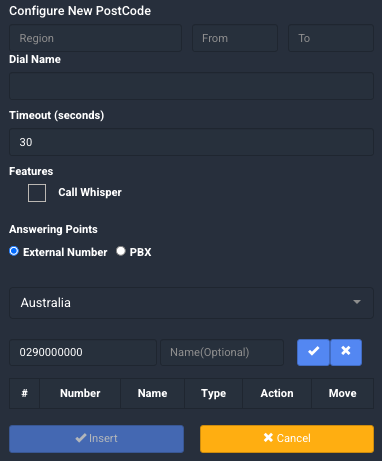
Fill out the form with the following fields:
| Region | This is the region name of the postcode (for example, Campbelltown NSW, Maroochydore QLD). This will show on your completed postcode widget as the range name. |
| From | The starting postcode of your range, eg: 2000 |
| To | The ending postcode of your range, eg: 2999. If you are configuring a single postcode as an input, this must match your From entry. |
| Dial Name | Optional, a name for your Dial event. |
| Timeout (seconds) | The time in seconds we will attempt to call the Answering point before classifying the call as "Unanswered". |
| Call Whisper | Select this box to add a call whisper audio file. For more information, see How to add a call whisper |
| Answering Point |
For an External number (ie: a number that is not with Jet Interactive), use the dropdown to select the country for this number, and enter the number in full including area code and give this an optional name. Select the blue tick to save. For a Jetphone extension, select PBX, then choose our system and extension from the dropdowns. Select the blue plus to add this extension. |
Once your answering point is configured, select the blue Insert button to save this range.

Your new range will be saved in your Postcode widget configuration window.
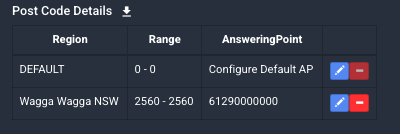
Repeat this process for every postcode range, ensuring that you cover all entry options from 0001 to 9999. If you have a lot of ranges to configure, we recommend periodically saving your callflow as a draft to ensure you do not lose any work.
Once all your ranges have been entered, click anywhere on the canvas to save the widget.
To complete your setup, connect your Answered node to a Hang Up widget, and your Busy and Unanswered nodes to a voicemail.
For more information on how to complete your voicemail widget, please view our article on this here: How to add voicemail
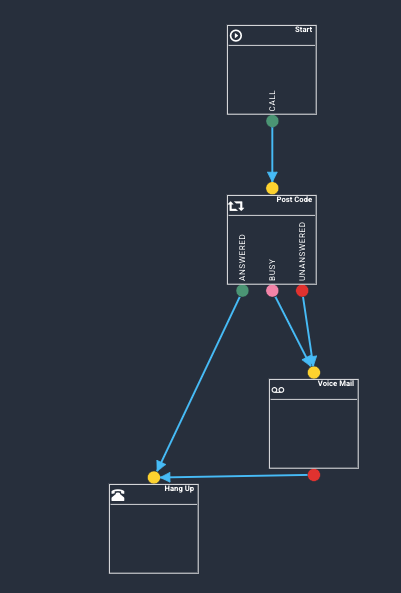
Your callflow should now be at 100%.

You can save the callflow as a draft OR save it as available to make the change live on all associated phone numbers. Saving your callflow automatically creates a new version so that you can easily roll back any changes.
List of useful Australian postcodes
NSW Postcodes |
|
|---|---|
|
ACT |
2600-2639, 2900-2920 |
|
Albury / Wodonga |
2640, 2641, 3690 |
|
Armidale |
2350, 2351 |
|
Blue Mountains |
2780, 2570, 2758, 2785-2787, 2571, 2847, 2845 |
|
Canberra - Queanbeyan |
2600-2620, 2900-2949 |
|
Central Coast - NSW |
2250-2267 |
|
Cessnock |
2321, 2325-2327 |
|
Coffs Harbour |
2450, 2451 |
|
Gosford |
2250, 2251, 2253, 2256-2263 |
|
Gosford |
2250, 2251, 2253, 2256-2263 |
|
Grafton |
2460, 2461 |
|
Hunter Valley |
2320-2338 |
|
Katoomba |
2780, 2701, 2706 |
|
Maitland |
2320, 2321, 2323 |
|
Newcastle |
2280-2309, 2315 |
|
North Shore |
2060-2113, 2153-2154, 2119-2122 |
|
Northern NSW |
2431-2490, 2830-2844 |
|
Northern Rivers |
2413-2484, 2460-2465, 2450 |
|
NSW North Coast |
2444-2490 |
|
NSW South Coast |
2500-2551 |
|
Penrith |
2748-2751, 2760, 2773, 2774 |
|
Port Maquarie |
2443, 2444 |
|
Richmond |
2753-2755, 2757, 2758 |
|
Riverina Area |
2640-2660 |
|
Wagga Wagga |
2650, 2651, 2661 |
|
Western Suburbs - NSW |
2123-2168, 2745-2770 |
|
Wollongong |
2500-2530 |
VIC Postcodes |
|
|---|---|
|
Ballarat |
3350, 3352, 3353, 3354 |
|
Bendigo |
3550, 3555, 3556 |
|
East (Melbourne) |
3101-3148 |
|
Geelong |
3214-3216, 3218-3220 |
|
Geelong / Queenscliff / Torquay |
3214-3216, 3218-3228 |
|
Melbourne CBD |
3000-3001 |
|
Mildura - Wentworth |
2648, 3496, 3498, 3500, 2717 |
|
Mornington Peninsula |
3931, 3934-3944 |
|
Morwell - Latrobe Valley |
3825, 3828, 3838, 3840, 3844, 3842 |
|
North (Melbourne) |
3047-3100 |
|
Phillip Island |
3922-3926 |
|
Shepparton - Mooroopna |
3629, 3630 |
|
South (Melbourne) |
3149-3207 |
|
West (Melbourne) |
3011-3044 |
QLD Postcodes |
|
|---|---|
|
Cairns |
4851-4899, 9980-9999 |
|
Gold Coast |
4210-4221, 4223-4227, 9726, 9728, 9729 |
|
Ipswich |
4300-4349, 9597-9599 |
|
Mackay |
4734-4805, 9940-9959 |
|
Rockhampton |
4690-4736, 9920-9939 |
|
South East Queensland |
4000-4350, 4499-4601 |
|
Sunshine Coast |
4500-4601, 9900-9919 |
|
Townsville |
4806-4824, 4835-4850, 9960-9979 |
SA Postcodes |
|
|---|---|
|
Adelaide Hills |
5157, 5152, 5153, 5201, 5233, 5240-5244, 5250-5252, 5255 |
|
Adelaide Plans |
5118, 5371, 5400, 5401, 5501, 5502 |
|
Barossa Valley |
5230-5353, 5355, 5356, 5360, 5372-5374 |
|
Flauricu Peninsula |
5202, 5204, 5210-5214, 5251 |
|
Kangaroo Island |
5220-5223 |
|
Lower Eyre Peninsula |
5606, 5607, 5610, 5630, 5631 |
|
Murray Mallee |
5301-5304, 5307, 5332, 5346, 5312 |
|
Port Pirie |
5422, 5431, 5472, 5473, 5480-5483, 5490, 5491, 5495, 5521-5523, 5540 |
|
Riverland |
5320-5322, 5330-5333, 5340-5346 |
|
Strathalbyn |
5153, 5157, 5201, 5214, 5245. 5254. 5256 |
|
Whyalia |
5600, 5601, 5608, 5609 |
|
York Peninsula |
5522, 5550, 5552, 5554-5558, 5568, 5570, 5573, 5554-5557, 5580-5583 |
NT Postcodes |
|
|---|---|
|
Darwin |
0800-0833 |
WA Postcodes |
|
|---|---|
|
Kalgoorlie - Boulder |
6430, 6432 |
|
Kununurra - Wyndham |
6743, 6740 |
|
North West Coast |
6713, 6714, 6718, 6720 |
|
Port Headland |
6721, 6722 |
|
Tom Price - Paraburdoo |
6751, 6754 |
TAS Postcodes |
|
|---|---|
|
Burnie |
7320, 7322 |
|
Finders Island |
7255 |
|
King Island |
7256 |
|
Launceston |
7250 |
METRO POSTCODES (NOTE: these include PO BOXES) |
|
|---|---|
|
Canberra Metro |
2600-2620 & 2900-2914 |
|
Sydney Metro |
1000-2249 & 2760-2770 |
|
Darwin Metro |
0800-0820 & 0900-0910 |
|
Brisbane Metro |
4000-4207 & 9000-9499 |
|
Adelaide Metro |
5000-5199 & 5900-5999 |
|
Hobart Metro |
7000-7010 & 7249-7250 |
|
Melbourne Metro |
3000-3207 & 8000-8499 |
|
Perth Metro |
6000-6199 & 6800-6999 |
|
CBD POSTCODES (NOTE: these include PO BOXES) |
|
|---|---|
|
Canberra CBD |
2600, 2601, 2610 |
|
Sydney CBD |
1100-1299, 2000, 2001, 2007, 2009 |
|
North Sydney CBD |
1545-1559, 2059-2060 |
|
Darwin CBD |
0800, 0801, 0820, 0822 |
|
Brisbane CBD |
4000, 4001, 4003, 9000-9015 |
|
Adelaide CBD |
5000, 5001, 5004, 5005, 5810, 5839, 5880-5889 |
|
Hobart CBD |
7000, 7001 |
|
Melbourne CBD |
3000-3006, 3205, 8000-8399 |
|
Perth CBD |
6000, 6001, 6004, 6827, 6830-6832, 6837-6849 |