To complete a smartnumber activation, you will need to know the number you are activating and the EROU holder.
You can search for the EROU holder here: https://thenumberingsystem.com.au/#/number-register/search
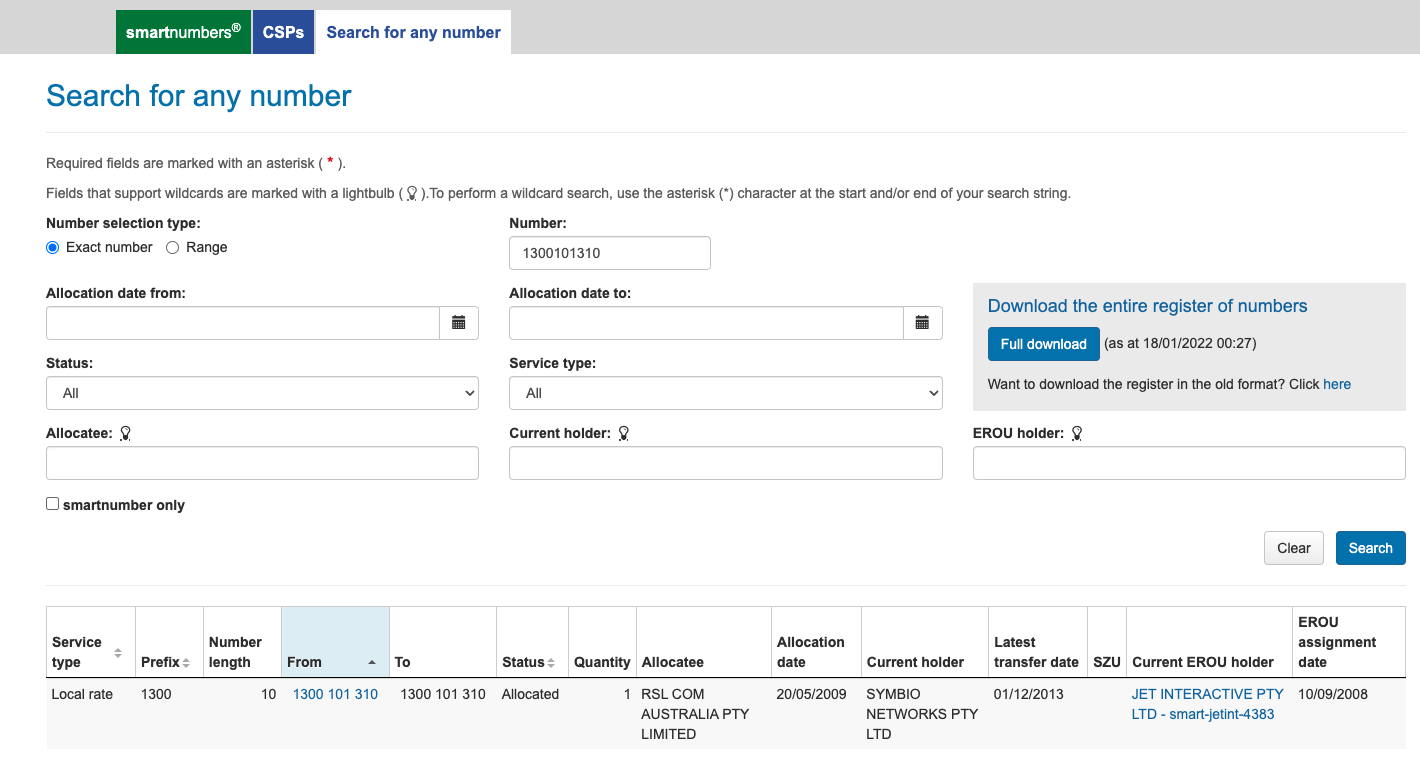
Enter the full number in local format (ie: not with +61) and the system will tell you what carrier the number is currently with, and any EROU holder details.
Eg: from the image below, you can see the Jet main number of 1300 10 13 10 is help by SYMBIO and the EOUR is with JET INTERACTIVE PTY LTD - smart-jetint-4383.
Submit activation request
Log into the Symbio Ticketing Portal, select Tickets and Create.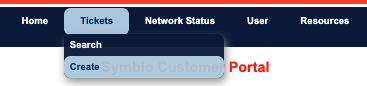
Select the ticket fields to be a Service Request, for Number Assignment, Non Service Affecting, and use the Zendesk ticket number for this port as the external reference.
Note - there is a "Smartnumber Activation" category under Number Porting - don't use this.
If you use this category, the ticket goes to the Porting team who take 5+ business days to look at new tickets.
The team responsible for activations is also the Number Assignment team, and the Porting team will simply reassign this ticket to them - while having added 2-5+ business days to your ticket resolution time.
The subject should be "ACMA Activation - *insert account name"
Copy + paste the description below and replace the red text:
Hi team please activate the below Smartnumber from ACMA.

Number: *insert number(s) to be activated

EROU: *insert EROU eg: JET INTERACTIVE PTY LTD - smart-jetint-4383

Route to 51643.
Click Create down the bottom.