This article will show you how to add a new call on your Jet Phone for mobile.
When you have one call established, you can place that call on hold and make a second call.
To place a second call using the dial pad
-
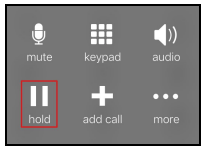
Tap Hold to put the first call on hold
-
Tap Add Call
-
Use the Phone (Dial Pad), Contacts or History to place your second call.
For more information on the Jet Phone for mobile visit our website.